
RFC Hub Automatically Converts Google Docs to Markdown
 Thomas Hunter II
@tlhunter
Thomas Hunter II
@tlhunter
RFC Hub automatically parses formatting information from a Google Docs document and converts it into the appropriate Markdown formatting. Of course, Markdown contains a lot of semantic information that Google Docs simply doesn't contain, for example code formatting sections. This conversion process is seemingly magical so this document explains the process, as well as tips to help make future migrations easier.
Example Document #
Here is a document that was written in Google Docs, then copied and pasted into a new RFC Hub document. No manual formatting was performed on the document:
As you can see in the documents, basic formatting like bold and italic text was converted properly. This is pretty much expected. Headings were also duplicated as well. Notably, in the Google Doc the headings dropdown was used to format the document. This semantic information was copied over (a Heading 1 in Google Docs becomes a # h1 heading in Markdown). Again not too surprising. Ordered and unoredered bullet lists, links, and even tables are converted as well.
The most interesting part is that both inline code samples and the full code blocks were duplicated as well. How did RFC Hub know to make the conversion? It's a lot simpler than you think. At a high level RFC Hub examines the font choices for the document, guesses if the font is a monospace font, and moves on to the next step. If the font is wrapped around words within a block of text it becomes an inline code sample, but if the font represents its own block of text it then becomes a fenced code block.
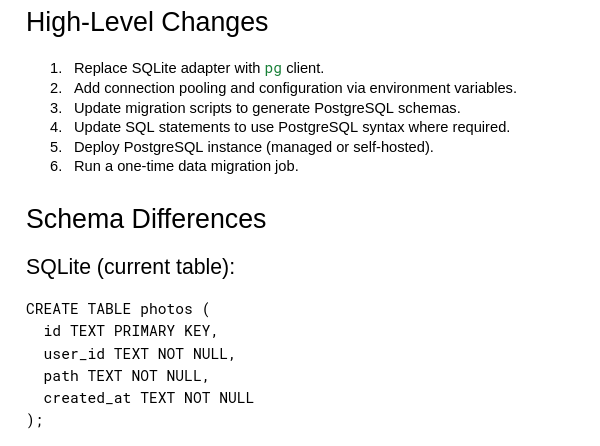
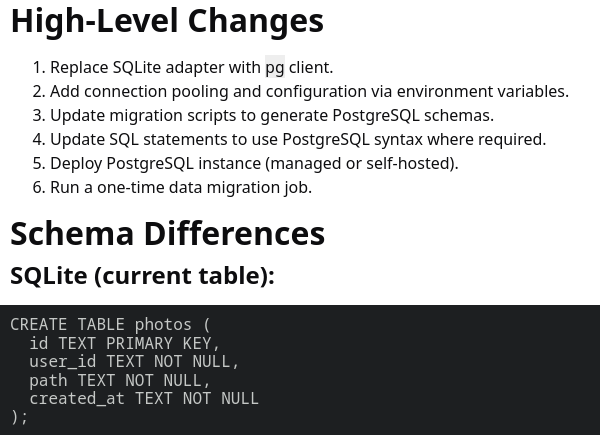
RFC Hub currently doesn't perform any syntax guesses on the code blocks. That means you'll need to manually prefix the fenced code blocks with the correct language (e.g. js or sql in the sample document).
Shortcomings #
There are of course some things to keep in mind with this approach:
- Images aren't copied over correctly.
- You'll need to delete the image code from your RFC upon pasting.
- You'll then need to download them then upload to RFC Hub and replace the image lines
- Colors and font selections aren't copied over.
- Detection of monospace fonts doesn't always work. For example, Roboto Mono works better than Consolas.
If your entire Google Doc is formatted in a monospace font then you'll get weird results as well.
